Philips HearLink 2
- 4.0
- Rating
- 100.00K
- Installs
- Free
- Price

 Analysis by App-foxy
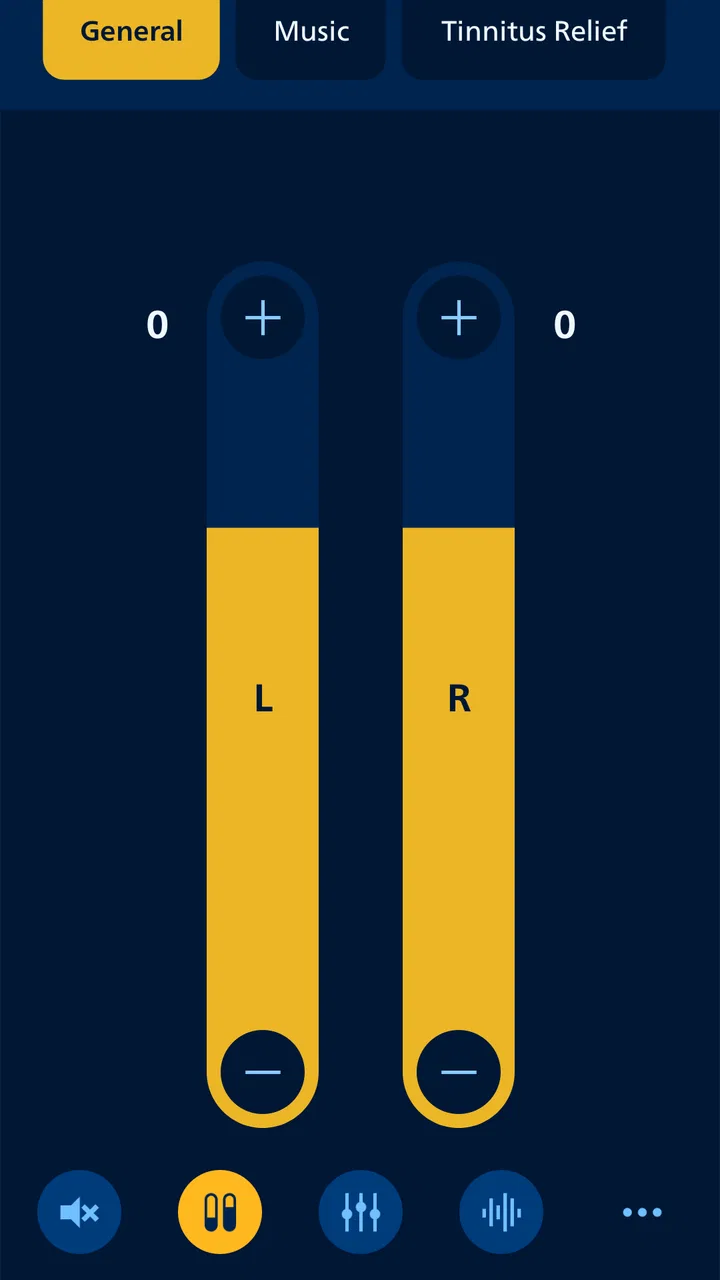
I spent time with Philips HearLink 2 as a medical app for managing compatible hearing aids, and my first impression was that its value comes from reducing small moments of friction. Instead of reaching for the hearing aid itself whenever the sound feels too quiet or too sharp, I can use the phone as a discreet control surface. That sounds simple, but it matters in places where adjusting a device openly may feel awkward, such as a meeting, a restaurant, or public transport.
The app is developed by SBO Hearing A/S and is available free of charge for everyone. It has a 4.1 average from around 3,700 ratings, with more than 100,000 installs, so it has already attracted a meaningful group of hearing-aid users. I would not treat those figures as a substitute for a personal trial, though. Hearing needs, phone habits, and compatible equipment vary considerably. My view is that this is most useful when you already use supported Philips HearLink hearing aids and want a clearer, quieter way to make everyday adjustments.
How the app feels to use in everyday situations
I find the most useful way to judge a hearing-aid control app is to notice whether it helps me stay involved, rather than pulling my attention away to manage technology. In the sections that follow, I’ll focus on how discreet phone-based control fits into ordinary routines, including the moments when a quick adjustment is genuinely convenient and when it may be better to leave things alone.
You May Also Like

 Blood Strike: 2.5 Anniversary
Blood Strike’s Loadouts Turn Every Drop Into a Tactical Gamble
A close look at Blood Strike’s custom loadouts: how fast access to signature weapons reshapes its battle royale rhythm, rewards preparation, and narrows the gap between fights.

 Pandora - Music & Podcasts
Pandora’s Music Is Easy to Start, but Harder to Recover
Pandora’s strength is its low-effort path from a seed to a station. Its weak spot is how much confidence it asks you to place in connection, setup, and quiet recovery.

 8 Ball Pool
 Is Built on Rivalries, Rematches, and Routine
A close look at the rivalries, rematches, shared routines, and unanswered safety questions that turn a quick pool match into a persistent mobile community.

 Samsung Music
’s Quiet Strength Is Playing What You Already Own
Its reach comes less from spectacle than from dependable access to a personal library. That simplicity is both the app’s strongest retention engine and its ceiling.

 AccuWeather: Weather Radar
AccuWeather Review: A Quick, Clear Forecast for Everyday Decisions
For everyday plans, the best forecast is the one you can understand quickly. AccuWeather makes rain timing, radar, and local conditions easy to act on, with a few trade-offs.

 Hill Climb Racing
Why Hill Climb Racing Still Turns Crashes Into One More Run
A tiny car, a bumpy hill and one more upgrade: Hill Climb Racing keeps resurfacing because its simple chaos makes every near-miss feel personal.
More From Our News Desk



Readability and navigation that favor quick decisions
What I value most in a hearing-aid companion app is not a crowded collection of controls, but a layout that lets me understand the current situation quickly. Philips HearLink 2 is built around the practical task of controlling hearing aids from a phone. That focus makes more sense than presenting the app as a general hearing test or a replacement for professional care. I open it because I need to change something, check a setting, or regain control without drawing attention to myself.
The store summary describes control “with the touch of a finger,” and that is the right way to think about the experience. The phone becomes a familiar object rather than another specialist device to learn. For someone who already knows how to use basic phone controls, this can make hearing-aid adjustments feel less intimidating. The app is also rated for everyone, which fits its role as a practical control tool rather than an age-restricted entertainment product.
Readability is especially important for people who may already be dealing with visual strain, reduced contrast sensitivity, or difficulty processing information quickly. I found that the app’s usefulness depends on whether the important control is easy to identify at the moment it is needed. A good habit is to explore it at home first, in a quiet room, rather than attempting to learn the interface during a noisy conversation. That preparation turns an adjustment into a short routine instead of a stressful search.
I would also recommend setting up a personal sequence for common situations. For example, I might check the app before leaving home, make sure the hearing aids are responding, and then avoid experimenting once I am already in a busy café. This is a small but valuable workflow: the app is most accessible when I use it proactively, not only after sound has become uncomfortable.
Why the phone can be easier than the hearing aid itself
Small physical controls can be difficult for people with limited dexterity, tremors, reduced sensation in their fingers, or trouble locating buttons by touch. A phone does not remove every motor challenge, but it can shift the interaction to a larger, more familiar surface. I can hold the phone in front of me, make a deliberate tap, and put it away without repeatedly touching the hearing aids.
This is one of the app’s strongest inclusive qualities. It does not require me to expose the hearing aids or manipulate tiny controls while someone is speaking. For a person who finds fine motor movements tiring, that difference may be more important than the number of available settings. It also helps when wearing gloves, handling shopping bags, or sitting in a position where reaching the ears is inconvenient.
There is a trade-off, however. A phone-based control system introduces another object that must be available, charged, and usable. Someone who has difficulty with touchscreens, accidental taps, or small on-screen targets may find a physical control easier. The app is therefore not automatically better for every user with motor limitations. It is better when the person is more comfortable making a clear phone gesture than handling the hearing aid directly.
I would test this with the phone held in the hand I use most naturally. If reaching the screen requires changing grip, removing gloves, or asking for help, the supposed convenience may disappear. The best setup is the one that reduces steps in the real environment, not the one that looks easiest during a calm demonstration.
Sensory needs and the importance of predictable adjustments
Hearing-aid users do not all experience sound in the same way. One person may need more audibility in a quiet conversation, while another may be overwhelmed by competing noise or sudden changes in volume. An app such as this is useful because it gives the user a discreet way to respond to those differences as they occur, rather than accepting an uncomfortable setting until the next appointment.
My practical advice is to make one change at a time and then listen for a short moment. Changing several controls together makes it difficult to know what actually helped. It is also easier to return to a comfortable state when I remember the last adjustment. This matters for users who become fatigued by too many choices or who find rapid sensory changes unpleasant.
The app should be viewed as a bridge between professional fitting and daily experience, not as a diagnostic tool. If a setting repeatedly feels wrong, that pattern is useful information to take to an audiologist or hearing-care professional. I would not use a comfortable short-term adjustment as evidence that a larger hearing problem has been solved.
Another overlooked benefit is discretion. Hearing difficulty can create social pressure, particularly when a person does not want to interrupt a conversation to explain that the sound is unclear. Being able to make a quiet adjustment on a phone may help someone stay engaged. That does not improve hearing by itself, but it can reduce the social burden attached to managing it.
Situational access: home, work, travel, and social spaces
At home, Philips HearLink 2 is most helpful when I want to make a quick change without searching for the hearing aids. This can be useful while moving between rooms, watching television, speaking with a family member, or preparing to go outside. The phone is usually nearby, so the control feels integrated into an existing routine rather than like a separate medical task.
In a workplace, the discreet approach is more significant. During a meeting, I may not want to touch my ears or announce that I need an adjustment. A phone screen can look like an ordinary moment of checking something, which gives me more privacy. I would still set expectations with colleagues when necessary, because no app can guarantee that every voice or room will become easy to follow.
Restaurants are a realistic test. Noise arrives from several directions, conversations overlap, and the acoustic environment can change when a nearby table becomes louder. In that setting, the app may help me respond without leaving the table. The limitation is that a phone screen can itself become distracting, and repeatedly adjusting settings may take attention away from the people I am trying to hear. I would make a small change, put the phone down, and judge the result rather than constantly monitoring it.
Travel creates a different challenge. Airports, stations, and vehicles combine announcements, movement, background noise, and time pressure. Having a familiar control method can reduce anxiety, especially if I prepare before the journey. I would not rely on the app as my only way to manage the hearing aids, though. Carrying the usual physical accessories and knowing how to operate the aids directly remains sensible if the phone is unavailable or the connection does not behave as expected.
For family members or support workers, the app may also make assistance less intrusive. A trusted person can help someone learn the basic workflow without immediately taking over the hearing aids. That can support independence, provided the hearing-aid user remains in control of the decisions. The most respectful use is coaching: explain where to look, allow the user to make the adjustment, and step in only when requested.
What the app cannot solve
The biggest boundary is compatibility. Philips HearLink 2 is not a universal remote for every hearing aid. Its usefulness depends on having supported Philips HearLink equipment and a phone setup that works with it. If you use another brand, or if your hearing aids are not compatible with the app, this is not the right download no matter how appealing the interface sounds.
It is also not a substitute for an audiologist, hearing assessment, or hearing-aid fitting. The app can make daily control more convenient, but it cannot examine hearing health or determine why speech is difficult to understand. Anyone experiencing a sudden change, discomfort, persistent imbalance, or a major decline in hearing should seek professional advice rather than trying to correct everything through phone controls.
Connection reliability is another practical consideration. A control app is only useful when the phone and hearing aids communicate as expected. I would test the setup at home, confirm that the controls respond, and learn what direct controls remain available on the hearing aids. That preparation is particularly important for older adults or anyone who becomes anxious when technology behaves differently from one day to the next.
Phone accessibility settings can help, but they do not guarantee a perfect experience inside every app. Larger system text, display magnification, voice interaction, or a simplified home screen may make the phone easier to use overall, yet a control that is visually clear in one context may still be difficult in bright sunlight or low light. I would judge the app with the actual phone, case, lighting, and hand position I use every day.
Battery management is part of the same trade-off. The app is free, but the phone still needs enough charge to be available when an adjustment is needed. Someone who rarely carries a phone, dislikes touchscreen controls, or prefers a dedicated physical remote may be happier with a different solution. The usual alternative is not necessarily less capable; it may simply fit that person’s habits better.
Version, support expectations, and learning curve
The current version is 1.7.2, and the app runs on Android 8.0 or later. That makes it relevant to people who keep an older Android phone rather than replacing it frequently. Even so, I would check the phone’s software, Bluetooth behavior, and general condition before assuming the experience will be smooth. A phone that struggles with other everyday tasks may not be the best foundation for a medical control app.
The release date was January 17, 2023, which places the app in a fairly recent generation of mobile hearing-aid tools. I would still approach updates carefully. When an app is central to daily hearing control, it is sensible to update at a convenient time, test the connection afterward, and avoid installing an update immediately before an important trip or appointment.
The learning curve is manageable when I focus on the few actions I use most. I do not need to explore every option in one sitting. I can first learn how to open the app, identify the connected hearing aids, make a basic adjustment, and return to a comfortable state. After that, I can explore less frequent controls when I have time. This staged approach is especially useful for users with memory difficulties or anyone who feels overwhelmed by technical menus.
I would also write down a short personal reminder in plain language, such as “quiet room,” “busy place,” or “return to normal,” if that helps. The point is not to memorize technical terminology. It is to connect the app’s controls with situations I recognize. A family member can help create that reminder, but the wording should match the user’s own way of describing sound.
Who should choose it, and who should look elsewhere?
I would recommend Philips HearLink 2 to a person who already owns compatible Philips HearLink hearing aids, carries an Android phone, and wants more discreet day-to-day control. It is particularly promising for users who dislike handling small hearing-aid controls, want to make adjustments in social settings, or benefit from keeping the phone as the central tool in their routine.
I would be more cautious for someone who has difficulty using touchscreens, frequently forgets or loses their phone, or needs a completely independent control method. In those cases, a physical remote, direct hearing-aid controls, or help from a hearing-care professional may be more dependable. I would also not choose this app simply because a hearing problem has recently appeared; the first priority in that situation is proper assessment.
Compared with the usual alternative of adjusting the hearing aids directly, the app offers privacy and a potentially easier surface for deliberate taps. Compared with a dedicated remote, it avoids carrying another device but makes the phone part of the chain. Compared with professional support, it is immediate and convenient but far less informative. Those distinctions are important: the app complements fitting and care rather than replacing them.
One of the most useful ways to judge it is to test three environments over several days: a quiet room, a conversation with moderate background noise, and a busier public place. Notice not only whether the sound improves, but also how many steps the adjustment takes, whether the screen is easy to read, and whether using the phone feels socially comfortable. That small trial reveals more than a quick setup demonstration.
An inclusive verdict for daily hearing control
After using Philips HearLink 2 as a practical companion, I see it as a focused tool rather than an all-purpose hearing solution. Its strongest contribution is giving compatible hearing-aid users a discreet, familiar way to respond to changing situations. That can support independence for people with fine-motor difficulties, reduce the need to touch the ears in public, and make adjustments less socially visible.
Its accessibility is situational rather than universal. A larger phone interface may be easier than tiny hearing-aid controls, while the need to operate a touchscreen may create a new barrier for someone else. The app also depends on compatible equipment, a usable phone, and a connection that behaves consistently. Those are not minor details; they determine whether the promised convenience appears in real life.
For me, the best reason to try it is not the feature count but the change in routine: I can prepare before entering a difficult environment, make a modest adjustment when needed, and keep the interaction private. I would pair that convenience with professional hearing care and a backup plan for situations where the phone is unavailable.
As a free medical app for everyone, Philips HearLink 2 is an easy option to test if its equipment requirements match your setup. I would recommend it to users seeking discreet control and a more approachable alternative to manipulating hearing aids directly. I would skip it when a physical control is more reliable or when the hearing aids are not supported. Within its intended role, it is a thoughtful way to make everyday hearing-aid management feel more personal, less conspicuous, and easier to fit around real life.
FAQs for Philips HearLink 2
01What features does the Philips HearLink 2 offer for hearing assistance?
Philips HearLink 2 provides advanced hearing assistance with features like noise reduction, sound personalization, and feedback management. It offers connectivity with smartphones, allowing users to stream audio directly. Additionally, the app includes a feature for remote control adjustments, making it easier for users to personalize their hearing experience.
02Is Philips HearLink 2 compatible with both Android and iOS devices?
Yes, Philips HearLink 2 is designed to be compatible with both Android and iOS devices. It supports a wide range of smartphones and tablets, ensuring users can enjoy its features regardless of their device. Compatibility ensures seamless connectivity and an enhanced user experience across different platforms.
03How user-friendly is the Philips HearLink 2 app for beginners?
The Philips HearLink 2 app is designed with user-friendliness in mind, featuring an intuitive interface that is easy to navigate. It includes step-by-step guides and tutorials to help beginners adjust settings and utilize the app's features effectively. This makes it accessible even to those who are not tech-savvy.
04What are the main benefits of using the Philips HearLink 2 app?
The Philips HearLink 2 app offers several benefits, including personalized hearing settings, direct audio streaming, and remote control of hearing aids. It enhances the overall hearing experience by allowing users to adjust their settings in real-time and provides access to customer support and troubleshooting tips directly through the app.
05Are there any potential drawbacks to using the Philips HearLink 2 app?
While the Philips HearLink 2 app offers many advantages, some users may encounter compatibility issues with older devices. Additionally, those unfamiliar with smartphone technology might find the initial setup challenging. However, comprehensive support and user guides are available to assist in overcoming these hurdles.
Pros
- User-friendly interface with intuitive navigation.
- Seamless Bluetooth connectivity to devices.
- Personalized sound settings for various environments.
- Reliable performance with minimal lag or glitches.
- Supports a wide range of hearing aids models.
Cons
- Limited customization options for advanced users.
- Occasional connectivity issues with older devices.
- Battery consumption could be optimized further.
- Lacks detailed tutorials for first-time users.
- Some features require ongoing subscriptions.

Philips HearLink 2
Gallery